Gitassistant - Status of Git checkouts on disk and remote
Background to the application
The Gitassistant program is a GUI tool that shows a software developer the status of the Gitrepos on the current computer. The focus is not on one repo, e.g. the one in the current path, but on all Gitrepos which are currently located on
the developer computer. To do this, they are searched for under a specific path.
Some background about the application
The program was created in the context of my work as a working student. I was working as a software developer at the time. One time I was talking to a colleague during a break. The team I worked in wasn't very familiar with using Git and
what tools are available. I also lacked the knowledge that something like the Gitassistant already exists. I talked to my colleague about the fact that he often faces a problem as a developer in a company. He talked about the fact that
there are absences, such as illness or vacation, and then you don't remember where you stopped and where you last made changes to the code in the software. He also added that even after such a return, he would like to have an overview over
all repos to see whether other colleagues have already added changes there. Similarly, he said it would be good to be able to check all the statuses of the repos on the computer before the start of the absence due to vacation, so that
nothing is forgotten before he goes on vacation.
This problem gave me the idea to develop a program that would analyze and collect the states of the repos that are checked out on the developer system. And it was important that the developer only had to set the program to a specific path
where his repos are usually located. After that you can start the tool at any time and it would recognize the repos and find all changes.
Development in favour to colleagues in Visual Basic
After the conversation with my colleague and the idea of developing the program, I worked on the first version of Gitassistant. At that time, the team worked with programs developed in Visual Basic. At that time I already had
experience developing graphical programs using the language for Windows. Since the tool was developed for colleagues, unfortunately I can no longer show the original here. But at the time of development it could do the same thing that my
current development can do.
Actual redevelopment of the Gitassistant
Some time after I left the company, I still knew how I had developed the Gitassistant and what it could do. Nowadays I not much use Windows, but rather use Linux. And therefore the old Visual Basic was no longer suitable for such a program.
But the idea also occurred to me that I could sometimes use a Gitassistant. So I decided to develop the program again as a free program for Linux. The programming language C++ was considered as the programming language here because of the
knowledge of how to deal with frameworks for GUI tools. I couldn't use such a GUI framework for Python. This page shows the Gitassistant developed again in C++.
License Notice
This program shown here uses the Qt Framework. This happens under the conditions that I (intentionally) do not pursue any commercial goals or make a profit for the program shown here. The program does not statically link any libraries from
the Qt Framework. Any rights to these remain with the original developers of the Qt framework “The Qt Company”. The source code for the Gitassistant program shown here is publicly available as a repository on Gitlab.
Gitlab Repository Gitassistant
Usage of the Gitassistant
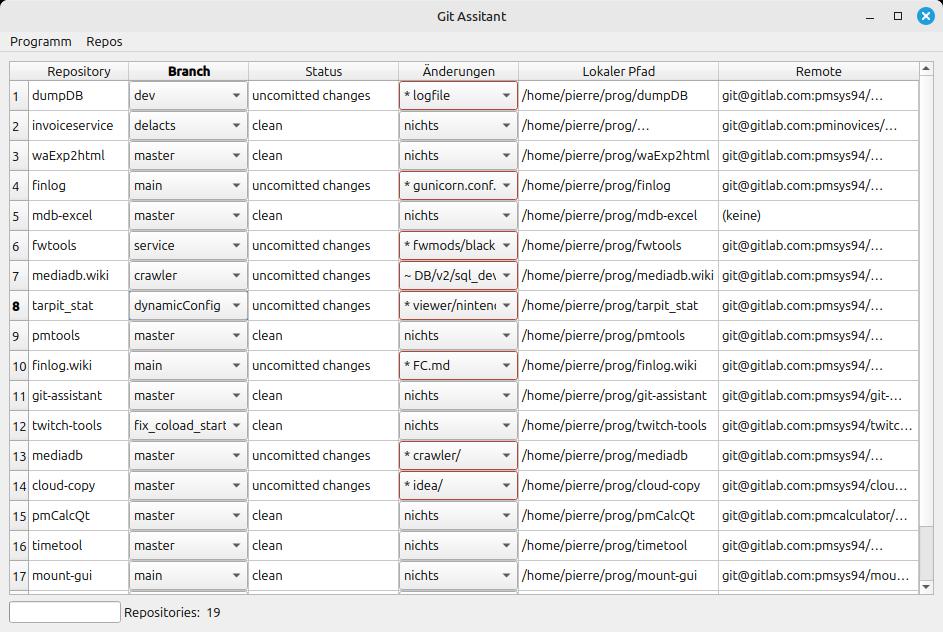
Click image to zoom.
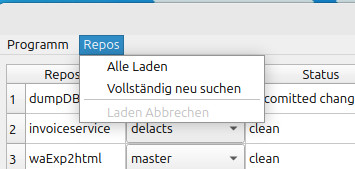
The Gitassistant is intended to be started as a GUI application. It is intended to give the developer an overview of the current states of the Git repos that are currently on the developer computer. To do this, at least one path must be
specified for the Gitassistant where it should look for Git repos. Of course, multiple paths can also be specified. If paths are set for searching, the Gitassistant starts searching for Git repos there. This usually happens very quickly. If
the Gitassistant is started and paths to search are already known, the Gitassistant will automatically start searching. You can also search the repos again with a button.
After the Gitassistant has found the repos, it starts collecting the current status of each repo. Since this can take some time per repo, the Gitassistant does this several times in parallel. The status is actually collected by calling the
Git client, which requires it to be installed. The general status, changed files, existing branches, incoming branches and incoming changes from the remote are then collected.
The reason why I start the Git client as a sub process with the Gitassistant is due to the selection of APIs. There are libraries, but often not for C++ programs. Sometimes there are some, but they often seem no longer maintained. And the
integration into the Qt C++ program wasn't entirely clear to me. At this point you should always have considered the installation of the library with the program and the compatibility with the user's Linux. So it seemed easier to me to use
the Git client, which is probably also installed on a developer computer. Furthermore, the program in Visual Basic under Windows also had to use the client there because the situation there was similar and more complex. Even using a Git
client was not as trivial in the Windows version as it was in the Linux version.
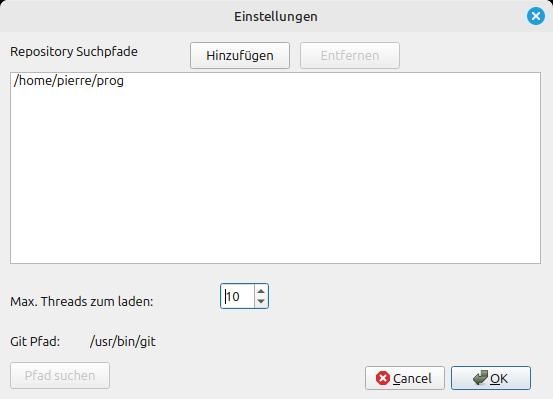
Gitassistant Screenshot of Linux Version (Settings). Click image to zoom.
The path to the Git client can first be set in the Gitassistant settings. Since the Gitassistant requires this, the path can be set manually here. However, the Gitassistant tries to determine the path itself. It does this under Linux
through the PATH environment variable.
Paths can be added to the list under which the Gitassistant starts searching for the Git repos.
Missing Features
The Gitassistant in the renewed development as a Linux program is initially still the same as the program developed for Windows. The original program, which was developed during my work as a working student, was created at the end of my
work. Therefore, it only achieved the function that this program, newly developed for Linux, can currently do. Even back then, I still had extensions to the possible features in my head. But these first have to be developed for the
Gitassistant on the Linux world. But currently this is not developed jet.
Planned features
| Feature | Description |
|---|---|
| Apply changed things |
In the table of repos found, there is actually a cell on the left with a checkbox. You should then be able to apply changes such as new or changed files to selected repos with a commit. If the Gitassistant shows that there are uncommitted
changes on a repo, you might want to be able to commit them straight away. You should also be able to push the changes to the remote. |
| Manage the branches of a repo |
The Gitassistant also allows you to select the branches of a repo. This way you can see all branches. If you select a different branch, this selection is executed as a checkout of the branch. Of course, creating a new branch is also being
considered. |
| Different origins |
The Gitassistant can currently only manage one remote. This must always be called “origin”. However, with the Git client it is also possible to use multiple remotes on one repository and the name "origin" is often
chosen as the default. However, each remote can have its own name and the branches then follow a branch on a remote. Support for this is still needed to be developed. This is also a major remodel. However, this function is rarely used.
Nevertheless, the function should be developed for the Gitassistant. |